How to Beat ATS in 2026: What Actually Works (And What Doesn't)
Most advice about beating applicant tracking systems reads like it was written in 2015 and copy-pasted every year since. "Use standard fonts." "Avoid tables." "Put keywords in your resume." Thanks, groundbreaking stuff.
Here's the problem: ATS platforms have evolved dramatically, but the advice hasn't. Meanwhile, job seekers are still getting rejected and blaming "the robots" without understanding what's actually happening behind the screen.
This isn't a tricks-and-hacks article. It's a clear explanation of how modern resume screening software works, what it actually evaluates, and how to communicate effectively to both the algorithm and the human who reads your resume after it passes.
What Is an ATS and Why Does It Keep Rejecting You?
An applicant tracking system is workflow software that manages the hiring pipeline. Companies like Greenhouse, Lever, Workday, and iCIMS use these platforms to collect, organize, parse, and rank applications.
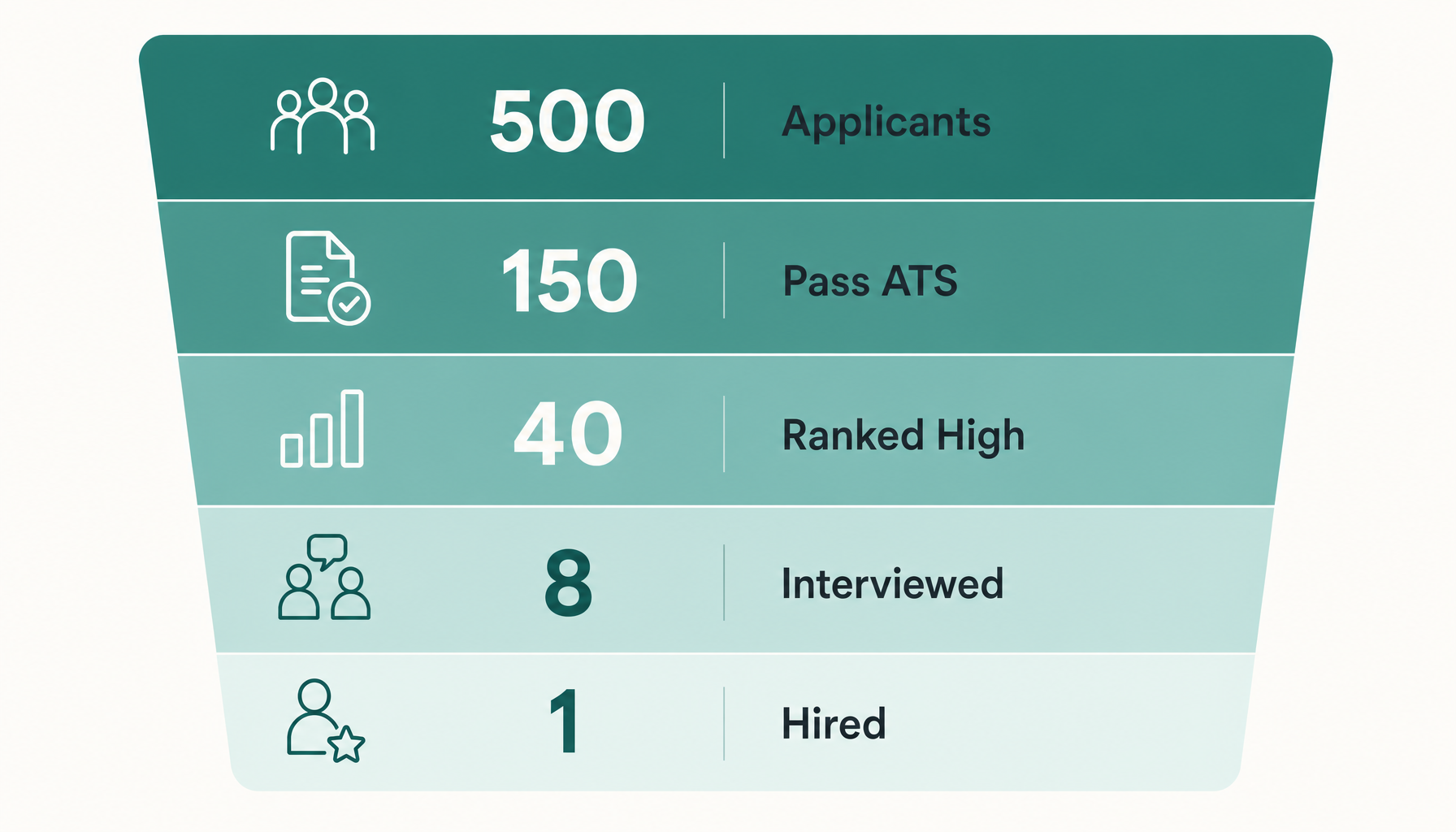
Here's what most people miss: the ATS isn't usually "rejecting" you outright. It's ranking you against other applicants. When a recruiter opens their ATS dashboard for a role with 400 applicants, they see candidates sorted by relevance score. If you're ranked #247, no human is ever scrolling that far.
The real reason your resume keeps disappearing isn't that the ATS "can't read it." It's that your resume doesn't match the job description closely enough to rank in the top tier that recruiters actually review.
The Biggest Myths About Beating ATS (Stop Doing These)
Myth 1: Stuff keywords in white text at the bottom of your resume. Modern ATS platforms detect hidden text. Recruiters using Greenhouse or Lever can see all text regardless of color. Some systems flag this as manipulation, which moves you to the bottom of the pile rather than the top.
Myth 2: You need to match keywords exactly or the ATS won't recognize them. Most enterprise ATS platforms in 2026 use semantic matching. They understand that "project management" and "managed projects" relate to the same skill. Workday's system, for example, maps synonyms and related terms. Exact matching still helps, but obsessing over it misses the bigger picture.
Myth 3: PDFs don't parse correctly. This was true a decade ago. Every major ATS now parses PDFs accurately. The exception: PDFs created from design tools like Canva that embed text as images. Standard PDFs from Word, Google Docs, or LaTeX parse fine.
Myth 4: A one-page resume scores better. ATS platforms don't penalize length. Recruiters might, but that's a human preference issue, not a software limitation.
How ATS Actually Scores Your Resume
Modern resume screening software evaluates three things:
1. Keyword matching against the job description. The system compares skills, qualifications, tools, and certifications mentioned in the posting against what appears in your resume. More relevant matches = higher score.
2. Contextual relevance. Advanced systems don't just check if "Python" appears somewhere—they assess whether it shows up in a context that suggests actual proficiency (like a bullet point describing a project) versus a passing mention.
3. Qualification alignment. Required years of experience, education level, and specific certifications get weighted heavily because recruiters configure these as hard filters.
The ranking algorithm varies by platform, but the principle is consistent: your resume is scored on how closely it mirrors the language and requirements of the specific job posting.
Keyword Optimization: How to Find and Use the Right Terms
Forget generic keyword lists. The only keywords that matter are the ones in the specific job description you're applying to.
Here's my process for extracting them:
- Copy the job description into a separate document. Strip out the company boilerplate and benefits section.
- Highlight hard skills and tools. These are the terms with zero ambiguity: "Salesforce," "SQL," "GAAP," "Kubernetes."
- Identify repeated concepts. If "cross-functional collaboration" appears three times, that's a priority skill for this role.
- Note the verbs they use. If the JD says "optimize," "scale," and "automate," those signal what success looks like in this role. Use them in your bullet points.
- Check qualifications for hard filters. "CPA required" or "5+ years experience" are likely configured as knockout criteria.
Now weave these terms naturally into your experience bullets. Not crammed into a skills section and nowhere else—distributed across your resume in context. For a deeper guide on this process, see how to use resume keywords from job descriptions.
Formatting Rules That Help (Not Hurt) Your ATS Score
The formatting advice is simpler than people make it:
- Use standard section headers. "Experience," "Education," "Skills." Don't get creative with "Where I've Made Impact" because parsers map content to standard fields.
- Avoid multi-column layouts. Single-column resumes parse in the correct reading order every time. Two-column designs sometimes scramble the sequence.
- Skip headers and footers for critical info. Some parsers ignore header/footer content. Don't put your contact information only in a header.
- Use standard bullet points. Round bullets (•) or hyphens. Not arrows, checkmarks, or custom symbols.
- Name your file clearly. "FirstName_LastName_Resume.pdf" — not "resume_final_v3_UPDATED.pdf."
That's genuinely it. Everything else—font choice, whether you use bold, your margin size—doesn't affect ATS parsing. For more formatting specifics, check out ATS resume tips that actually work.
How to Tailor Your Resume for Every Job Without Starting Over
The idea of rewriting your resume for every application sounds exhausting. Here's how to make it manageable:
Create a master resume. This is your complete document with every role, bullet point, project, and skill you've ever accumulated. It's probably 3-4 pages. You never send this anywhere.
Build a template version. Take your master resume and create a clean, formatted version with your strongest 10-15 bullets and a flexible summary section.
For each application, adjust three things:
- Your summary — rewrite 2-3 sentences to mirror the role's primary focus.
- Your bullet points — swap in the bullets from your master resume that best align with this specific JD. Adjust language to match their terminology.
- Your skills section — reorder and edit to prioritize the tools and competencies mentioned in this posting.
This process takes 15-20 minutes per application once you've built the master document. That investment dramatically outperforms blasting the same generic resume to 50 postings. For a step-by-step breakdown, see how to tailor your resume to any job description.
How to Know If Your Resume Will Pass Before You Apply
You've done the keyword research. You've tailored your bullets. But how do you know if it's actually enough?
This is where most job seekers operate blind. They send the application and hope. Then silence. Then repeat.
You can eliminate the guessing. Paste your job description into Resume Inspector — it's free, no signup needed — and see exactly which keywords your resume is missing in under a minute. You'll get a fit score showing how well your resume aligns with that specific role, plus a clear list of gaps you can fix before hitting submit.
Doing this before every application turns resume tailoring from a guessing game into a measurable process. You'll know your score, see what's missing, and fix it in minutes rather than wondering why you never hear back.
Try our free Job Keyword Scanner to see how your resume stacks up.
Try our free ATS Resume Checker to see how your resume stacks up.
Quick ATS Checklist Before Every Application
Run through this before every submission:
- Read the full job description and identify 8-12 key terms
- Confirm those terms appear naturally in your bullet points (not just a skills list)
- Check that your job titles and section headers use standard language
- Verify your resume is single-column with no text boxes or graphics containing words
- Ensure your contact info is in the body of the document, not just in a header
- Save as a clean PDF (exported from Word or Google Docs, not a design tool)
- Confirm your file name is professional and includes your actual name
- Run a fit analysis to verify you're not missing obvious keywords
That last step is the difference between hoping and knowing. Before you hit apply, run a quick ATS check — the free analysis shows your fit score and flags missing keywords instantly.
The goal was never to "trick" the ATS. It was always to communicate clearly — to software and humans alike — that you're genuinely qualified for this specific role. Do that consistently, and the interviews follow.