What to Put in an Email When Sending a Resume (With Ready-to-Use Templates)
You spent hours perfecting your resume. Then you attached it to an email, typed "Please find my resume attached," hit send, and heard nothing back. The problem wasn't your resume — it was the email carrying it.
Recruiters receive 50–200 applications per open role. Your email is the first impression, the packaging that determines whether someone actually opens your attachment or skips to the next candidate. Here's exactly what to include, why each element matters, and templates you can steal today.
Why Your Resume Email Matters More Than You Think
A 2024 study from Jobvite found that 47% of recruiters spend less than 60 seconds deciding whether to open a resume attachment. That decision is based entirely on your email — the subject line, the opening sentence, the overall professionalism of what they see before clicking anything.
Your resume email isn't a formality. It's a micro-cover letter, a proof of communication skills, and a navigational tool all in one. A sloppy email signals a sloppy employee. A clear, concise one signals someone who respects others' time.
Think of it this way: even if your resume is perfectly tailored to the job description (and you should verify that it is before sending), no one will see it if the email wrapper gets ignored.
The 5 Essential Elements to Include in Your Resume Email
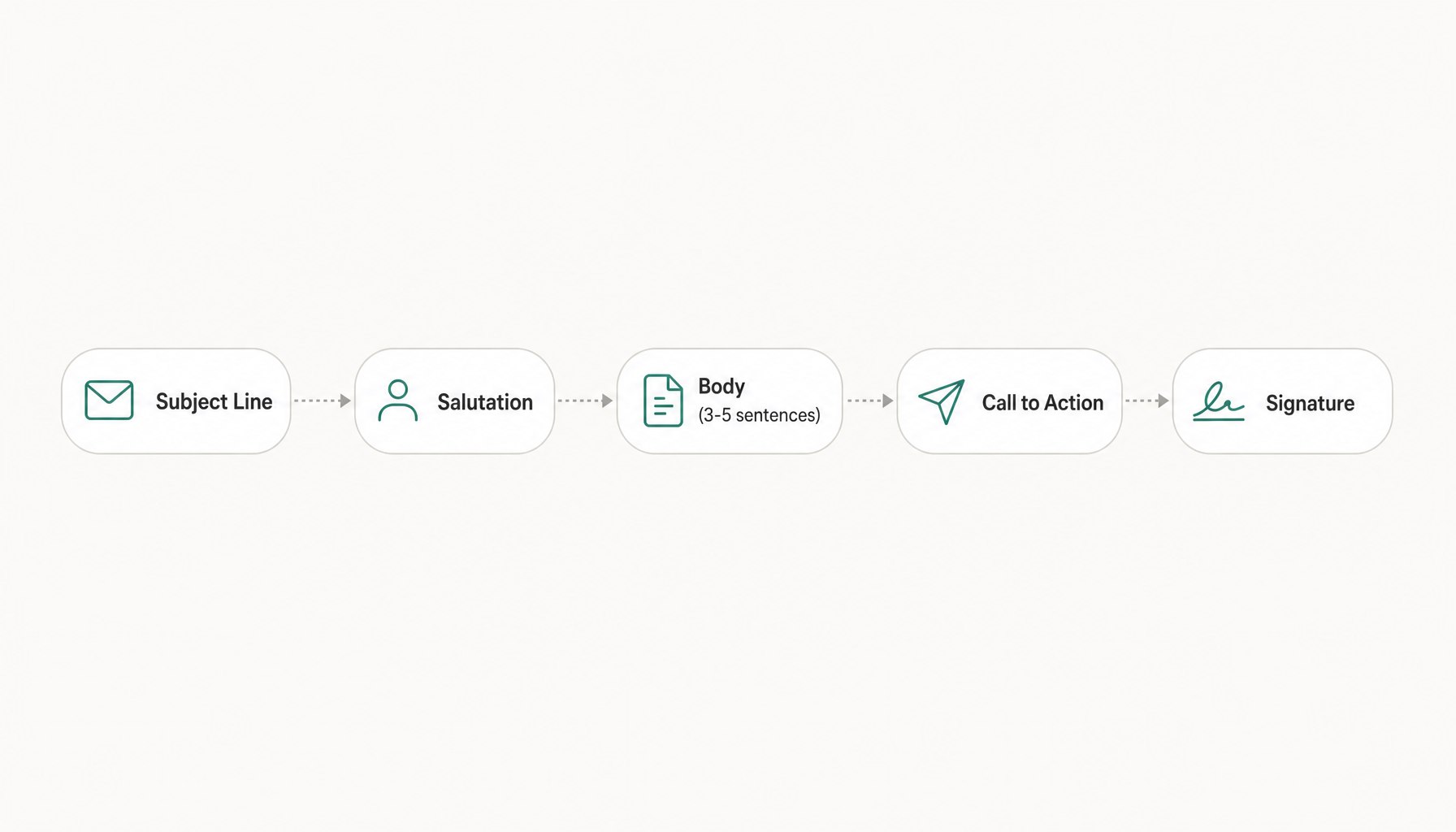
Every professional job application email needs these components:
- A specific subject line — tells the recruiter exactly what this email is about
- A proper salutation — addressed to a real person whenever possible
- A concise body — 3-5 sentences connecting you to the role
- A clear call to action — what you're asking for (interview, conversation, consideration)
- A professional signature — full name, phone number, LinkedIn URL
Miss any one of these, and you create friction. Friction means deleted emails.
How to Write a Subject Line That Gets Opened
Your resume email subject line is the single most important line you'll write. Here's the formula:
[Job Title] – [Your Name] – [Reference/Job ID if applicable]
Real examples:
Senior Data Analyst Application – Maria Chen – Ref #4821Marketing Manager Role – James Porter – Referred by Sarah KimApplication: UX Designer (Portland Office) – Alex Russo
Why this works: recruiters search their inboxes by job title. Including the role name means your email is findable weeks later. Adding your name makes it scannable. A reference number or referral name adds urgency to open it.
Never use these:
- "Resume" (too vague, looks like spam)
- "Job Application" (which job?)
- "Hi! Interested in a role at your company" (unprofessional, no information)
What to Say in the Email Body (Without Repeating Your Cover Letter)
The biggest mistake people make: treating the email body as a second cover letter. If you're attaching a cover letter, the email should be a brief introduction — not a duplicate.
Here's the structure:
Sentence 1: State the role you're applying for and where you found it. Sentence 2-3: One compelling reason you're a fit (your strongest qualification or most relevant accomplishment). Sentence 4: Reference attached documents. Sentence 5: Thank them and suggest next steps.
Example:
I'm writing to apply for the Product Manager position posted on your careers page. With five years leading cross-functional teams at Shopify — including launching a feature that increased merchant retention by 23% — I'm confident I can contribute to your product roadmap from day one. I've attached my resume and cover letter for your review. I'd welcome the opportunity to discuss how my experience aligns with your team's goals, and I'm available for a conversation at your convenience.
That's it. Four sentences. Everything a recruiter needs to decide whether to open the attachment.
Should You Paste Your Cover Letter or Attach It? (And Other Attachment Rules)
The attachment rules that matter:
- File format: PDF unless the posting explicitly requests .docx. PDFs preserve formatting across every device.
- File naming:
FirstName-LastName-Resume.pdfandFirstName-LastName-CoverLetter.pdf. Neverresume_final_v3.pdf. - Cover letter placement: Attach it as a separate file. Don't paste it into the email body unless the job posting specifically says "include your cover letter in the body of the email."
- File size: Keep attachments under 5MB total. Large files trigger spam filters.
- Don't zip files. Many corporate firewalls block .zip attachments entirely.
One more thing: if you're sending to a recruiter's personal email (cold outreach), keep attachments minimal. One resume PDF is sufficient. Sending three unsolicited attachments to someone who didn't ask feels aggressive.
3 Copy-Paste Resume Email Templates for Different Situations
Template 1: Applying to a Posted Job Listing
Subject: [Job Title] Application – [Your Name] – [Job ID]
Dear [Hiring Manager Name],
I'm applying for the [Job Title] position listed on [where you found it]. My background in [relevant skill/industry] — particularly [one specific accomplishment with a number] — aligns directly with what you've outlined in the role requirements.
I've attached my resume and cover letter for your consideration. I'd appreciate the opportunity to discuss how I can contribute to [company name]'s goals, and I'm happy to provide additional information at any time.
Thank you for your time.
[Full Name] [Phone Number] [LinkedIn URL]
Template 2: Referred by Someone
Subject: [Job Title] – [Your Name] – Referred by [Referrer's Name]
Dear [Hiring Manager Name],
[Referrer's Name] suggested I reach out regarding the [Job Title] opening on your team. We [briefly explain your relationship — worked together at X, connected through Y].
I bring [X years] of experience in [relevant area], most recently [one accomplishment relevant to this specific role]. I've attached my resume for your review.
I'd love to learn more about what you're looking for in this role. Would you be open to a brief conversation this week or next?
Best regards, [Full Name] [Phone Number] [LinkedIn URL]
Template 3: Cold Outreach to a Recruiter
Subject: Experienced [Your Title] – Open to [Target Role/Industry] Opportunities
Hi [Recruiter's Name],
I'm a [your title] with [X years] in [industry], currently exploring new opportunities in [target area]. My recent work includes [one quantified accomplishment relevant to roles they typically fill].
I've attached my resume in case any current or upcoming searches match my background. I'm particularly interested in [type of role/company/industry].
Happy to jump on a call if anything looks like a fit. Thanks for your time.
[Full Name] [Phone Number] [LinkedIn URL]
For guidance on writing effective cover letters to pair with these emails, that's a separate skill worth investing in.
Common Mistakes That Get Resume Emails Ignored or Sent to Spam
Spam triggers:
- Using "urgent" or "immediate" in the subject line
- Including more than one hyperlink in the body (some corporate filters flag this)
- Attaching .zip files or executable formats
- Sending from a novelty email address (partyguy87@gmail.com is real — I've seen it)
Professionalism killers:
- Addressing the email "To Whom It May Concern" when the hiring manager's name is listed on the job posting
- Writing more than 150 words in the body (they won't read it)
- Forgetting to actually attach the resume (more common than you think — always double-check)
- Using a generic email for every application without changing the company name or job title
Formatting mistakes:
- Writing the entire email in one massive paragraph
- Using colored fonts or HTML formatting (plain text looks more professional in most email clients)
- Including your full mailing address in the signature (unnecessary and takes up space)
Quick Pre-Send Checklist Before You Hit Send
Run through this before every application email:
- Subject line includes the job title and your name
- You've addressed a specific person (check LinkedIn, the job posting, or the company website)
- Email body is under 150 words
- You've mentioned the specific role and one relevant qualification
- Resume is attached as a PDF with a professional file name
- Cover letter is attached separately (if required)
- You've proofread for typos — especially the company name and hiring manager's name
- Your email signature includes your phone number and LinkedIn
- You've sent a test email to yourself to check formatting and attachments
- Your resume actually matches the job description you're applying to
Try our free Job Keyword Scanner to see how your resume stacks up.
Try our free Job Description Analyzer to see how your resume stacks up.
That last point is the one most people skip. Before you hit send, it's worth confirming your resume holds up against the specific job description. Paste the job posting into Resume Inspector — free, no signup required — and you'll see exactly which keywords your resume is missing before a recruiter or ATS ever flags the gap. It takes 60 seconds and can mean the difference between your email getting a response or getting archived.