Best Resume Format 2026: Which Layout Actually Gets You Hired (With Real Examples)
Picking a resume format isn't an aesthetic decision. It's a strategic one that determines whether your application survives automated screening, lands on a recruiter's desk, and communicates your value in the six seconds you get. Here's what actually works in 2026 — and how to match the right format to your specific situation.
Why Resume Formatting Rules Changed Again in 2026
Three shifts reshaped what counts as the best resume format in 2026:
Multi-modal ATS parsing. Applicant tracking systems like Greenhouse, Lever, and Workday updated their parsers in late 2025. They now handle two-column layouts better than before — but still choke on text boxes, headers/footers with critical info, and infographic-style designs. The gap between "looks modern" and "parses correctly" narrowed, but didn't disappear.
AI-assisted recruiter screening. Many mid-to-large employers now use AI tools that summarize resumes before a human sees them. These tools prioritize clear section headers, quantified achievements, and keyword density. If your format buries accomplishments inside dense paragraphs, the AI summary will miss them — and so will the recruiter who reads that summary.
Skills-first hiring expansion. More companies removed degree requirements in 2026 (IBM, Google, Accenture expanded this further). This means your skills section carries more weight, and the format you choose needs to surface relevant competencies earlier than legacy formats did.
The bottom line: format choice in 2026 is less about "which looks prettiest" and more about "which gets my relevant qualifications parsed, summarized, and noticed fastest."
The 3 Core Resume Formats: Chronological, Functional, and Hybrid
Chronological (Reverse-Chronological) Lists work experience from most recent backward. Each role includes company, title, dates, and bullet points. This is the default format recruiters expect.
Functional (Skills-Based) Organizes content by skill category rather than job history. Employment dates appear in a brief section at the bottom. Designed to obscure gaps or frequent job changes.
Hybrid (Combination) Opens with a skills summary or competency section, then follows with a concise chronological work history. Gives you the keyword-rich header of a functional resume with the timeline clarity recruiters want.
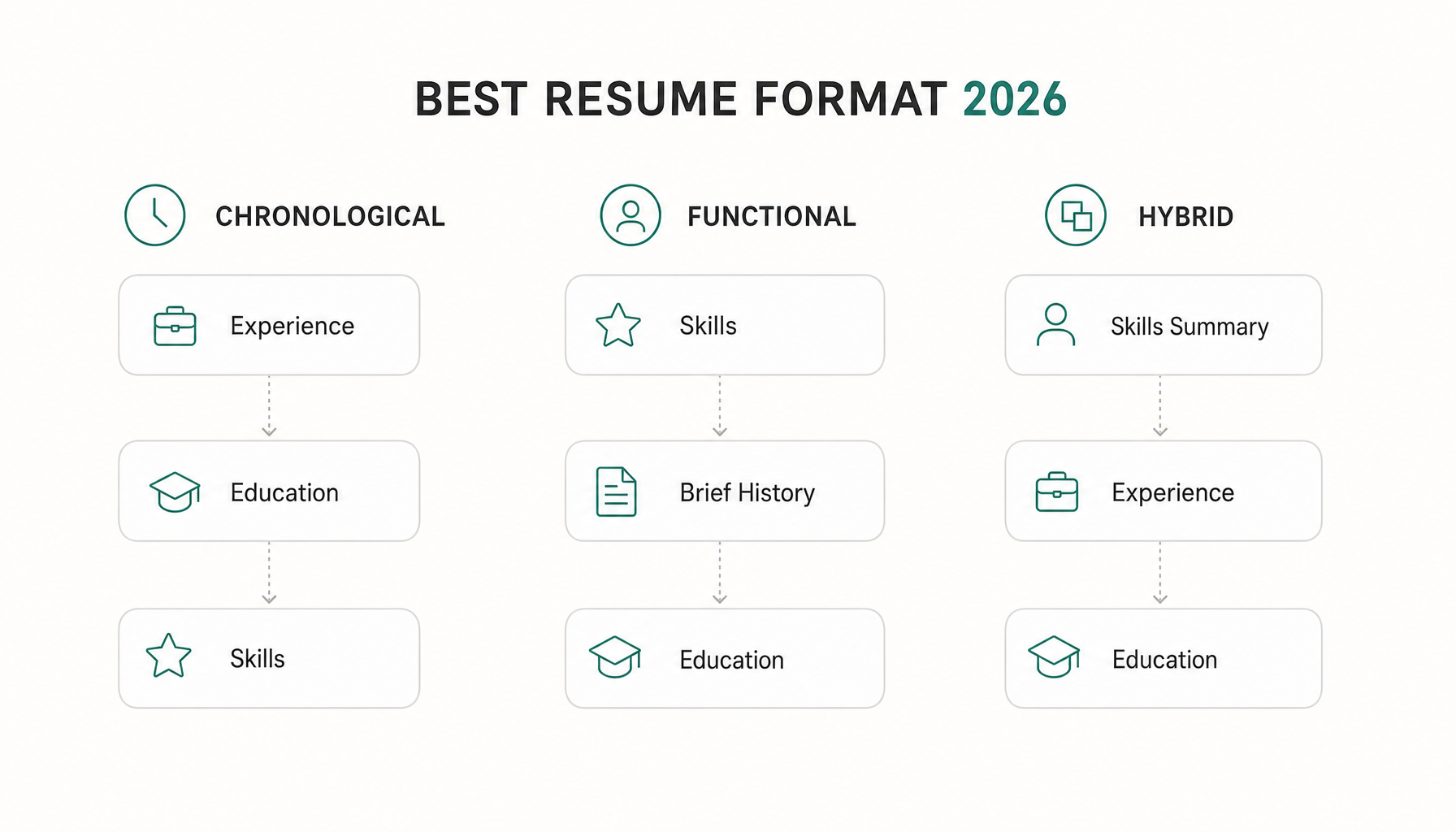
Which Resume Format Is Best for Your Situation in 2026?
Stop asking "what's the best format?" and start asking "what's my situation?" Here's the decision tree:
You have 3+ years of progressive experience in the same field → Chronological. Your trajectory tells the story. A senior marketing manager applying for a director role doesn't need tricks — they need a clean reverse-chronological layout that shows growth from coordinator → specialist → manager.
You're changing careers or industries → Hybrid. A former teacher moving into instructional design needs to lead with transferable skills (curriculum development, learning assessment, stakeholder communication) before showing school employment history. Pure chronological would bury the relevant skills; pure functional would raise red flags.
You have employment gaps of 6+ months → Hybrid. The skills summary up top gives you space to demonstrate current relevance. The chronological section below addresses the timeline honestly. Hiding gaps with a functional format backfires — recruiters in 2026 know exactly what a functional format is trying to hide.
You're an entry-level candidate or new grad → Chronological with a strong summary. You don't have enough work history to populate a hybrid's skills section with proof. Lead with internships, projects, and relevant coursework in chronological order. Add a two-line summary with your target role and key qualifications.
You're an executive (VP+) → Hybrid with an executive summary. A three-to-four line summary capturing scope (managed $40M P&L, 200-person org, three acquisitions) followed by reverse-chronological roles. Executives need the context that a pure chronological format delays.
How ATS Systems Read Your Resume Format (And What Still Breaks Them)
ATS software in 2026 is better than it was five years ago. But "better" doesn't mean "foolproof." Here's what still causes parsing failures:
Headers and footers. If your name, email, or phone number lives in a Word document header, many ATS platforms skip it entirely. You become a nameless application.
Tables for layout. Two-column layouts using tables parse inconsistently. Some systems read left-to-right across rows instead of down columns, jumbling your experience with your skills section.
Creative section titles. "Where I've Made Impact" instead of "Work Experience." "My Toolkit" instead of "Skills." ATS systems map content to predefined categories. Non-standard headers mean your experience might get filed under "other" — or nowhere.
File format. PDF is safest in 2026 for most systems. DOCX works too, but avoid Google Docs exports that embed invisible formatting. Never submit .pages files.
What actually works: Standard section headers (Professional Experience, Education, Skills, Certifications), single-column or simple two-column layouts, 10-12pt standard fonts (Calibri, Arial, Garamond), and consistent date formatting (MM/YYYY or Month YYYY).
Before submitting, run a free ATS compatibility check — paste the job description into Resume Inspector and see your fit score in under a minute.
The Hybrid Resume Format: Why It Wins for Most Job Seekers in 2026
For roughly 70% of applicants — anyone who isn't a pure new grad or a steadily-climbing single-industry professional — the hybrid format outperforms in 2026. Here's why:
It front-loads keywords. The skills summary at the top lets you mirror the exact language from the job description before the ATS even reaches your experience section. A data analyst applying to a role requesting "SQL, Tableau, predictive modeling, stakeholder reporting" can surface all four terms in the first three lines.
It satisfies both AI and human readers. AI summarizers pull from the top third of your resume most heavily. Humans scan in an F-pattern. The hybrid format puts your strongest qualifications exactly where both will look first.
It's honest about gaps without being apologetic. The skills section establishes competence. The chronological section shows the timeline. Recruiters get both data points without feeling manipulated.
Real example structure:
PROFESSIONAL SUMMARY
2 sentences: role target + top qualifications + scope

CORE COMPETENCIES
6-9 skills in a clean grid, pulled directly from target job descriptions

PROFESSIONAL EXPERIENCE
[Most Recent Role] — Company, Dates
• Achievement bullet with metric
• Achievement bullet with metric

[Previous Role] — Company, Dates
• Achievement bullet with metric

EDUCATION & CERTIFICATIONS
This structure works for career changers, professionals with 5-15 years of experience, people returning after gaps, and anyone targeting roles that emphasize skills over pedigree.
Formatting Details That Quietly Kill Your Application
These aren't "nice to have" fixes. Each one causes measurable screening failures:
Margins under 0.5 inches. Cramming content into narrow margins triggers rendering issues when ATS platforms convert your resume for display. Stick to 0.5-0.75 inch margins.
Inconsistent bullet formatting. Mixing solid circles, dashes, and arrows confuses parsers and looks sloppy to humans. Pick one bullet style.
More than two pages (for under 15 years of experience). Recruiters in 2026 still spend 6-8 seconds on initial scan. A three-page resume for a mid-career professional signals poor editing, not thoroughness.
Missing location. Many ATS platforms filter by location. If you're open to a role in Austin but your resume says nothing about location, you might get filtered out before a human sees you.
Graphics and icons for contact info. A phone icon or envelope icon next to your contact details can confuse parsers that read the image as a character. Use plain text.
How to Know If Your Format Is Actually Working for a Specific Job
You've chosen your format. You've structured it correctly. But here's what most guides leave out: the right format with the wrong language still loses.
A hybrid resume optimized for "project management" terminology won't score well against a job description asking for "program delivery" and "cross-functional coordination" — even if you've done exactly that work. Format gets you parsed. Keywords get you ranked.
The validation step most people skip: comparing their resume language against the specific job description they're targeting. Not generically — for each application.
Want to see how your resume actually scores against a specific job? Paste any job description into Resume Inspector — it's free, no signup needed — and you'll see exactly which keywords you're missing in under a minute. You've done the hard work of choosing the right layout. This tells you whether it's speaking the right language for the role you actually want.
Try our free Job Keyword Scanner to see how your resume stacks up.
Try our free Job Description Analyzer to see how your resume stacks up.
2026 Resume Format: Quick-Reference Checklist Before You Apply
- Format matches your career situation (use the decision tree above)
- Single column or clean two-column layout (no tables, no text boxes)
- Standard section headers: Summary, Experience, Skills, Education
- Contact info in document body, not header/footer
- Consistent date formatting throughout
- 10-12pt font, 0.5-0.75" margins
- File saved as PDF (unless the application specifies DOCX)
- Keywords from the job description appear in your top third
- Every bullet point includes a measurable result or specific scope
- Total length: 1 page (entry-level) or 2 pages (mid-to-senior)
- Ran a keyword gap check against the actual job posting
The best resume format in 2026 isn't the one that looks most impressive on your screen. It's the one that gets parsed correctly, surfaces your relevant qualifications instantly, and mirrors the language the employer already used to describe what they need. Pick the right structure, validate it against real job descriptions, and stop guessing whether your application is actually competitive.