How to Write a Resume Skills Section That Actually Gets You Interviews
Your resume skills section isn't a parking lot for every technology you've ever touched. It's a strategic weapon — one that determines whether an ATS passes you through or drops you into a digital void, and whether a recruiter spends their 6-second scan thinking "this person gets it" or "next."
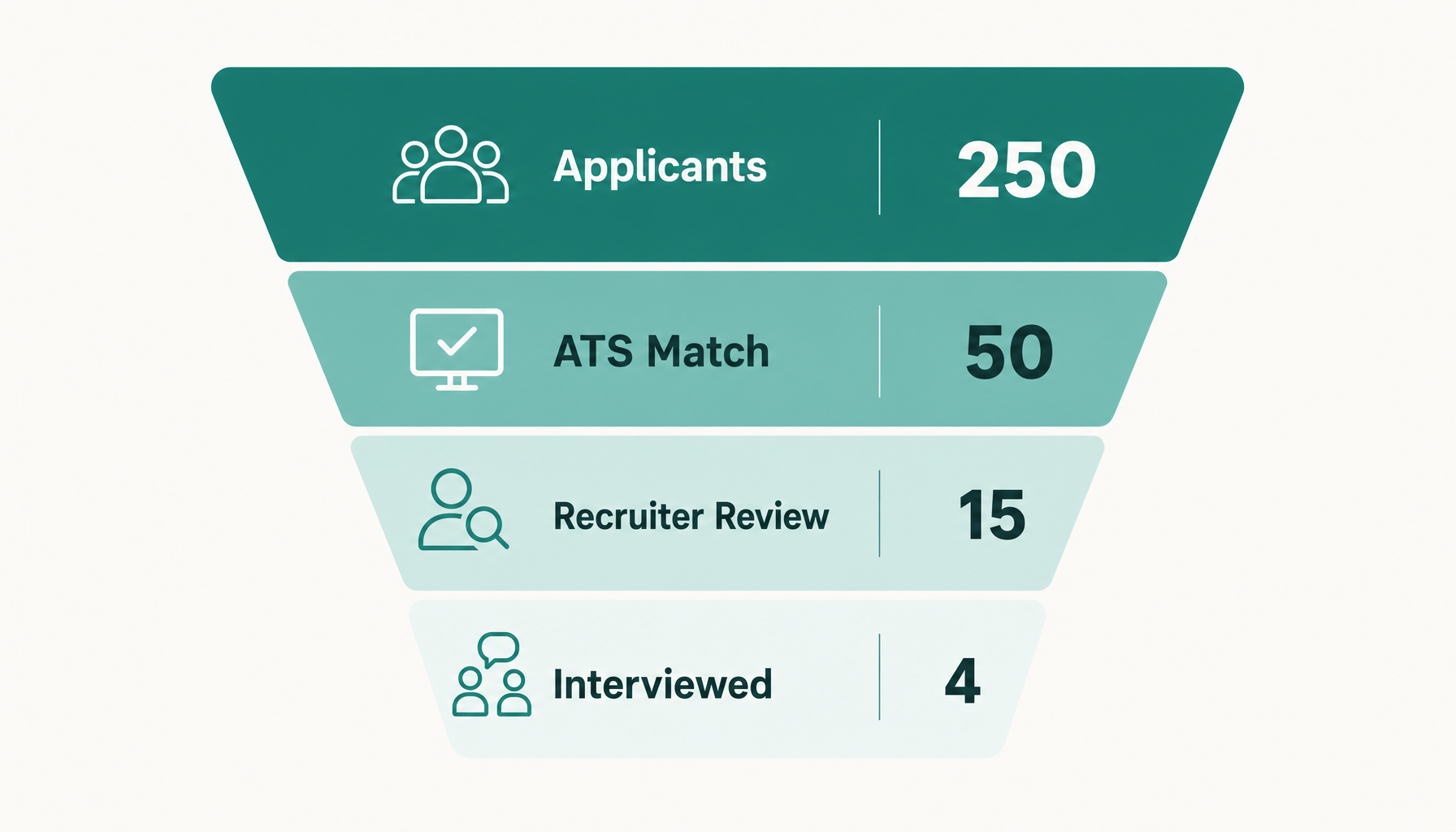
The problem? Most job seekers treat their skills section as static. They write it once, list everything they can think of, and paste it unchanged into every application. That approach worked in 2015. In 2026, with ATS systems parsing resumes against specific keyword requirements and recruiters drowning in 250+ applications per opening, a generic skills section is functionally invisible.
Here's how to build one that actually works.
What Is a Resume Skills Section (and Why It Matters More Than Ever)
The resume skills section is a dedicated block — usually 8 to 15 items — that lists your core competencies in a scannable format. It exists for two audiences simultaneously:
For ATS software: It's a keyword-matching zone. When a company's system scans your resume for "Salesforce," "Python," or "project management," your skills section is the easiest place to find exact matches. Missing a critical keyword here often means automatic rejection before a human ever sees your name.
For recruiters: It's a quick compatibility check. A hiring manager scanning for a data analyst who knows SQL, Tableau, and R can confirm fit in under two seconds if those skills are clearly listed.
The section matters more in 2026 because ATS algorithms have gotten more sophisticated — they now weight skills section placement and grouping, not just raw keyword presence anywhere in the document.
Hard Skills vs. Soft Skills: What Belongs in Your Skills Section
Hard skills are teachable, measurable abilities: Python, Google Analytics, financial modeling, AutoCAD, HIPAA compliance, Kubernetes. These belong in your skills section almost always.
Soft skills — communication, leadership, problem-solving — are trickier. Here's the rule: only include a soft skill if the job description explicitly names it AND you can't demonstrate it elsewhere on your resume.
For example, if a project manager role lists "cross-functional collaboration" as a requirement and your bullet points already describe leading cross-departmental initiatives, you don't need it in the skills section. But if the JD emphasizes "stakeholder communication" and your experience section doesn't cover it directly, include it.
A strong ratio: 70-80% hard skills, 20-30% soft skills. Never let soft skills dominate — recruiters see "team player, detail-oriented, self-starter" and mentally check out.
How to Choose the Right Skills to List on Your Resume
Stop guessing. The job description tells you exactly what to list. Here's the process:
- Pull the job description apart. Identify every skill, tool, technology, and competency mentioned. Look in the requirements, preferred qualifications, AND the job duties sections.
- Cross-reference with your actual abilities. If you've used the skill professionally or in substantial projects, it's fair game. If you watched a YouTube tutorial once, it's not.
- Prioritize by frequency. If "SQL" appears three times in a posting and "Excel" appears once, SQL goes first.
- Include exact phrasing. If the JD says "data visualization," don't write "data viz." ATS systems can be literal.
A data analyst applying to a role requesting SQL, Python, Tableau, statistical modeling, and A/B testing should list exactly those terms — not "data tools" or "analytics software."
Where to Put the Skills Section on Your Resume
Placement depends on your career stage:
Top of resume (below summary, above experience) — Best for career changers, recent graduates, or highly technical roles where screening for specific tools is the first filter. If you're a software engineer and the recruiter needs to see "React, TypeScript, AWS" immediately, put skills up top.
Below experience section — Best for senior professionals whose accomplishments speak louder than tool lists. A VP of Marketing with 15 years of results doesn't need "Microsoft Office" competing for prime real estate with revenue numbers.
Sidebar or column layout — Works for design-forward resumes, but test ATS compatibility first. Many ATS systems struggle with multi-column formats and may scramble your skills into unreadable text.
For most job seekers in 2026, top placement wins. Recruiters are scanning faster than ever, and ATS algorithms give slightly more weight to skills appearing in the first third of the document.
How to Format Your Resume Skills Section
Three formats that work:
Simple list (most common, most ATS-safe):
Skills: Python, SQL, Tableau, A/B Testing, Statistical Modeling, Google Analytics, R, Data Storytelling
Categorized list (best for roles requiring diverse skill types):
Technical: Python, SQL, R, Tableau, Power BI
Marketing: Google Analytics, SEMrush, HubSpot, A/B Testing
Project Management: Agile, Jira, Stakeholder Communication
Proficiency-rated (use sparingly):
Python — Advanced | SQL — Advanced | R — Intermediate | Tableau — Advanced
The proficiency approach is polarizing. Some recruiters appreciate the honesty; others see "Intermediate" and immediately question why you listed it. Only rate skills if the job explicitly asks for proficiency levels or if you want to preempt interview questions about depth.
Never use progress bars or star ratings. They're meaningless (what's 4 out of 5 stars in JavaScript?), they waste space, and most ATS systems can't read them.
Skills to Include by Industry and Job Type
Software Engineering: Programming languages (specific versions matter — "Python 3" vs. "Python"), frameworks, cloud platforms, CI/CD tools, databases, version control. Example: React, Node.js, AWS Lambda, PostgreSQL, Docker, Git, TypeScript.
Marketing: Analytics platforms, automation tools, channel-specific expertise, CRM systems. Example: Google Analytics 4, HubSpot, Meta Ads Manager, SEO (technical + content), Marketo, Salesforce Marketing Cloud.
Finance: Modeling tools, compliance frameworks, ERP systems, analysis methodologies. Example: Financial Modeling, Excel (VBA/Macros), Bloomberg Terminal, SAP, SOX Compliance, DCF Analysis.
Healthcare: Certifications, EHR systems, compliance knowledge, clinical competencies. Example: Epic Systems, HIPAA Compliance, BLS/ACLS, Patient Assessment, Electronic Health Records, Care Coordination.
Project Management: Methodologies, tools, and transferable skills. Example: Agile/Scrum, PMP, Jira, Asana, Risk Assessment, Budget Management, Stakeholder Communication.
Notice that every example uses specific, concrete terms — not vague categories. "Data analysis" is weak. "SQL, Python (pandas), Tableau" is strong.
Common Mistakes That Kill Your Skills Section
Listing skills you can't defend in an interview. If "Machine Learning" is on your resume and an interviewer asks you to explain gradient descent, you'd better have an answer. Only list what you can discuss confidently for at least 5 minutes.
Including outdated technologies. Unless the job specifically asks for it, remove legacy tools that signal you haven't kept current. "Microsoft FrontPage" in 2026 raises eyebrows.
Stuffing irrelevant keywords. Listing "Photoshop" for an accounting role doesn't help — it suggests you didn't read the job description. Every skill should connect to the role.
Using the same skills section for every application. This is the biggest mistake. A static skills section means you're optimized for no job in particular. The section should shift with every application based on what that specific employer is asking for.
Duplicating your experience section. If your bullet points already describe extensive Python work, you still list "Python" in skills (for ATS matching), but don't waste skills section real estate on things that are obvious from your experience.
How to Tailor Your Skills Section to Every Job You Apply For
This is where most candidates give up — and where you gain an edge. Tailoring your skills section to each job description takes 10-15 minutes manually:
- Copy the job posting into a separate document
- Highlight every skill, tool, and competency mentioned
- Compare against your current resume skills section
- Add missing keywords you genuinely possess
- Remove irrelevant skills that dilute your match
- Reorder so the most-mentioned JD keywords appear first
For a real example: if you're a marketing manager applying to two different roles — one emphasizing "paid media, ROAS optimization, Meta Ads" and another emphasizing "content strategy, SEO, editorial calendar" — your skills section should look noticeably different for each application. Same person, different emphasis.
Try our free Job Keyword Scanner to see how your resume stacks up.
Try our free ATS Resume Checker to see how your resume stacks up.
The manual comparison works but gets tedious across dozens of applications. If you want to shortcut the process, paste any job description into Resume Inspector — it's free, no signup needed — and you'll instantly see which keywords from that specific posting are missing from your resume. It takes about 60 seconds versus 15 minutes of side-by-side comparison.
The deeper insight here: your skills section isn't a record of everything you know. It's a mirror that should reflect each job description back to the employer, proving immediate relevance. The candidates who rebuild this section for every application consistently outperform those who don't — because they pass more ATS filters and signal stronger intent to recruiters.
Before you submit your next application, run a quick check. Paste the job description into the free analysis tool and see exactly which keywords you're missing. No signup, no commitment — just a clear picture of how well your resume skills section matches what the employer is actually looking for.